
Salesforce Field Service ERP Integration: A Practical Guide
Field service teams and finance teams often work in two separate systems. Salesforce Field Service runs the jobs out in the field, while your ERP runs the money side, like orders, invoices, and pricing. This guide shows how to connect the two, so a job done in the field flows straight through to billing in your ERP, and finance data flows back to your technicians.
Quick answer
To connect Salesforce Field Service with your ERP or finance system, such as Microsoft Dynamics 365, you link both systems with Rapidi. Then you sync the data they share: work orders, service appointments, accounts, assets, products, and invoices. Rapidi runs in the cloud with no code. A finished work order can turn into an order or invoice in your ERP on its own, and asset data can flow back to Salesforce.
What is Salesforce Field Service, and why integrate it with an ERP?
Salesforce Field Service (formerly Field Service Lightning) is Salesforce's tool for running mobile service teams: scheduling, dispatching, work orders, service appointments, and on-site work. It is built on top of Service Cloud. It gives agents, dispatchers, and mobile staff one shared view of the customer.
On its own, though, Field Service does not run your finances. Pricing, orders, invoices, inventory, and posted transactions live in your ERP. That is usually Microsoft Dynamics 365 Business Central, Dynamics 365 Finance and Operations, or Dynamics NAV. Without integration, your technicians and your finance team work from two separate records. Connecting Salesforce Field Service to your ERP closes that gap, so service events flow straight through to billing, and financial data flows back to the people in the field.
Field service is hard to manage. Teams are spread out, jobs get assigned poorly, mobile tools can be weak, and service and finance often do not share data. The market has also moved to the cloud. A 2025 field service management market report shows that cloud tools now win most new projects, which makes it easier to link field service to finance and the rest of your business.
What data syncs between Salesforce Field Service and your ERP?
An ERP integration keeps the records that both service and finance rely on in sync across systems. The table below shows the core flows in a Salesforce Field Service to Microsoft Dynamics integration built with Rapidi.
| Salesforce Field Service object | ERP / finance object (Dynamics 365) | Direction |
|---|---|---|
| Accounts / Contacts | Customers | Both directions |
| Work Orders | Sales Orders | Field Service to ERP |
| Completed Work Order | Order / Invoice | Field Service to ERP |
| Products / Price Books | Items / Item Prices | ERP to Field Service |
| Assets | Items / Serial Nos. | Both directions |
| Invoices / Posted documents | Posted Sales Invoices | ERP to Field Service |
Two-way flows keep both systems in step on their own. One-way flows have a clear master system. Rapidi templates are a starting point. You can change the field mappings, filters, and writeback rules to fit how your business works.
How do you create work orders from any case?
Create and manage work orders for field service, view Knowledge articles right away, and track SLA compliance with Milestones. Work orders are linked to Accounts, Contacts, Assets, Cases, Entitlements, and other objects, so you can pull in data from across Salesforce. With Rapidi, the account, pricing, and product data from your ERP is already there. So a technician opens a work order with the full commercial picture, not just the service ticket.
How do you turn a work order into an invoice in your ERP?
When a work order is done and needs to be billed, a work order can automatically be converted to an order or an invoice directly in your ERP system with the use of Rapidi data integration. The service event becomes a finance record with no manual re-keying. That removes a common cause of billing delays and data-entry errors between field service and accounting.
How do you write asset data back to Salesforce?
Service teams often need to track assets or devices on the customer side. With Rapidi, asset details can be written back from the ERP invoice to Salesforce, carrying information such as serial number and item number. That keeps the asset history in Salesforce complete, so the next technician sees exactly what was installed or serviced, and when.
Why does a disconnected service experience slow case resolution?
When your team lacks the full customer picture, cases take longer to close, customers call back after a first visit fails, and some leave for good. Return visits are costly too. Recent field service industry data shows about 1 in 4 service calls needs at least one more visit, and each truck roll can cost from $150 to more than $600. A big reason is missing information, the kind your ERP already holds.
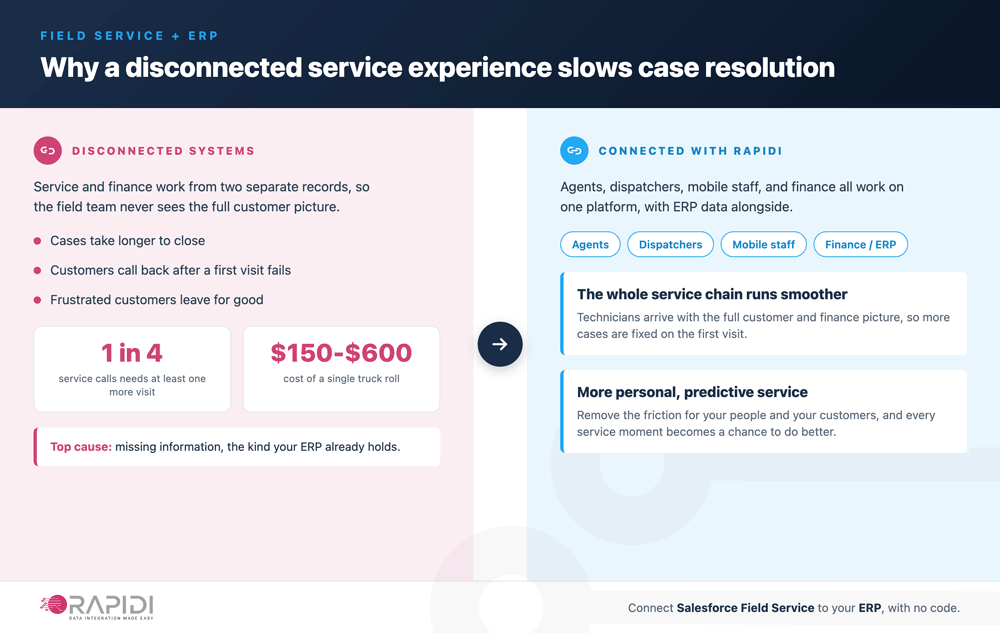
When agents, dispatchers, and mobile staff all work on one platform, with finance data alongside, the whole service chain runs smoother and the customer feels it. Every service moment is a chance to do better. Remove the friction for your people and your customers, and you move toward more personal, predictive service.
How does integration enable personalized service?
Service Cloud gives you faster, smarter support, so customers get answers when they need them, across many channels. Connecting Salesforce Field Service to your finance system extends that to the back office. Technicians, agents, and finance all work from the same numbers. Problems get fixed before they grow, and your back-office and finance work stays efficient with integrated systems powered by Rapidi.
Why choose Rapidi for Salesforce Field Service ERP integration?
Rapidi has been building data integrations for over thirty years.
- Microsoft Partner since 1987. Deep expertise across Microsoft Dynamics 365 Business Central, Dynamics 365 Finance and Operations, Dynamics NAV, and the wider Microsoft ecosystem.
- Salesforce Partner since 2007. Production-grade Salesforce integrations, including Field Service and Service Cloud, for hundreds of customers.
- No code, fully customizable. A cloud-based, drag-and-drop transfer designer with pre-built templates for the most common Salesforce to Dynamics flows.
- Real-time or scheduled. Two-way or one-way transfers, with custom filters, field mappings, and writeback.
- Personal, human support. A dedicated team works with you through setup and beyond.
Frequently asked questions
1. Is Salesforce Field Service the same as Field Service Lightning?
Yes. Field Service Lightning (FSL) is the old name. Salesforce renamed it to Salesforce Field Service. The way you integrate it with your ERP is the same, regardless of the name your team uses.
2. Which ERP and finance systems can Rapidi connect to Salesforce Field Service?
Rapidi has pre-built templates for Microsoft Dynamics 365 Business Central, Dynamics 365 Finance and Operations, and Dynamics NAV, and can connect to other ERP and finance systems too.
3. Does the integration need any code?
No. You set up Rapidi in a cloud-based, drag-and-drop designer. Templates cover common flows, and custom logic uses formulas inside Rapidi, not outside code.
4. Can a finished work order become an invoice on its own?
Yes. When a work order is done, Rapidi can turn it into an order or invoice in your ERP, so billing happens with no manual re-entry.
5. Can the integration run in real time?
Yes. Rapidi supports both real-time and scheduled transfers. You choose instant sync on data change or batch runs on a schedule.
6. What customer data syncs between Salesforce and the ERP?
Accounts and contacts map to ERP customers, usually both ways, so a new or updated customer in one system shows up in the other.
7. How are products and prices kept the same?
Products and price books usually flow from the ERP to Salesforce, so field staff see current prices while finance keeps the master record.
8. Can asset and serial-number data be written back to Salesforce?
Yes. Asset details such as serial number and item number can be written back from the ERP invoice, so the asset history stays complete.
9. Does the integration work both ways?
Yes. Rapidi supports two-way and one-way transfers. You decide which system is master for each object.
10. How long does a Salesforce Field Service ERP integration take to set up?
With templates, a basic customer and product sync can run quickly. A full work-order-to-invoice flow usually takes a few days, including testing, depending on how much you customize.
11. How does Rapidi avoid duplicate records?
Rapidi links records across systems using primary keys with an external-ID writeback, so later runs update the matching record instead of making duplicates.
12. What happens if a transfer fails partway?
Rapidi logs every error and retries on its own. Failed records are held back, so you can re-run from the last good point once the system is back.
13. Can I control which records sync, and when?
Yes. You can sync by status flag, work-order stage, or a date filter, so only the records that need to move are checked on each run.
14. Does Rapidi support multi-currency service orders?
Yes. The currency on the order maps to the ERP order currency, with exchange rates pulled from the ERP when the order is created.
15. What support does Rapidi give during setup?
A dedicated Rapidi team works with yours through setup, field-mapping reviews, and go-live, with real human help, not chatbots.
Talk to a Rapidi expert
If you are weighing a Salesforce Field Service to ERP integration, the fastest path is a short call with a Rapidi solution architect. We will look at your service and finance data, sketch the transfer setup, and give you a realistic timeline.