When we introduced Albert in 2025, it was a bold step: an AI assistant that didn't just answer questions but actually executed tasks within your MyRapidi interface. Nearly a year later, Albert has grown from a promising beta into a comprehensive integration management assistant. Here's everything that's new.
Quick Summary:
Since Albert's beta launch in 2025, we've shipped major new capabilities that transform how you manage your Rapidi integrations through AI.
Key AI capability updates include:
- Set Up Integrations: Guide Albert to configure new Connections, Schedules, or Transfers.
- Decode Errors: Quickly interpret error messages with actionable troubleshooting advice.
- Manage Schedules: Easily set up and oversee automated integration tasks.
- Run and Manage Transfers: Execute, monitor, and terminate transfers directly from the chat.
- Execute Tasks: Provide instructions for task execution and routine procedures.
- Communicate Seamlessly: Connect with Slack or send emails directly via Albert for real-time collaboration and notifications.
- Transfer Management - Run, monitor, and manage transfers directly through Albert
- Skills System - Structured knowledge packages that give Albert specialized expertise
- Persistent Memory - Albert remembers your preferences and context across sessions
- Natural Language Scheduling - Set up schedules by telling Albert what you need in plain language
- Real-Time Streaming - See Albert's responses as they're generated
- Agent Cloning - Duplicate working agent configurations with one action
- Statistics Dashboard - Track AI usage, costs, and adoption across your team
Meet Albert: Your AI Agent on the MyRapidi Configuration Interface
At Rapidi, we continuously strive to make your experience with your integration setup smoother and more intuitive. That's why we built Albert - our AI agent designed to help you navigate and work with the configuration interface effortlessly.
Who is Albert?
Albert is your personal AI agent inside MyRapidi. Replacing our former Copilot from the wiki, this advanced assistant is here to help you execute tasks related to your integration. Whether you're setting up transfers and connections or managing schedules, Albert is designed to assist you every step of the way.
Albert vs. earlier Co-pilot
Albert is not just an upgrade - it's a complete transformation. Unlike the old Copilot (on the wiki), which provided guidance based on MyRapidi wiki information, Albert actively assists you within the MyRapidi configuration interface. With built-in AI functionality, Albert can both provide step-by-step guidance and execute tasks on your behalf. For example, you can instruct Albert to set up Connections, authorize a Connection, set up Schedules, notify you via email or Slack - transforming your interface into a smarter, more interactive experience.
Getting Started with Albert: Where to Find Albert and What He Can Do
Albert is available in MyRapidi under each service: Service > Albert > Chat
Albert is integrated directly into MyRapidi's main menu under each service. To access him:
- Navigate to your Service > Albert > Chat
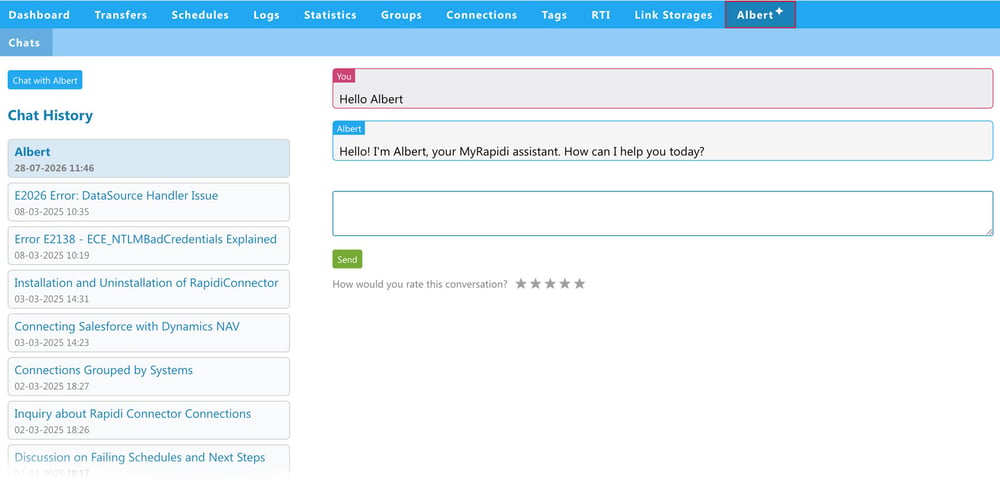
Chat History
Your chat history is saved, and after a few messages, a summary title is automatically generated to encapsulate the discussion topic. This makes it easy to pick up where you left off.
With Albert, you can:
- Set Up Integrations: Guide Albert to configure new Connections, Schedules, or Transfers.
- Decode Errors: Quickly interpret error messages with actionable troubleshooting advice.
- Natural Language Scheduling - Set up schedules by telling Albert what you need in plain language
- Manage Schedules: Easily set up and oversee automated integration tasks.
- Transfer Management - Run, monitor, and manage transfers directly through Albert. Execute, monitor, and terminate transfers directly from the chat.
- Execute Tasks: Provide instructions for task execution and routine procedures.
- Communicate via email, Slack, and other collaboration channels: Connect with Slack or send emails directly via Albert for real-time collaboration and notifications.
- Skills System - Structured knowledge packages that give Albert specialized expertise
- Persistent Memory - Albert remembers your preferences and context across sessions
- Real-Time Streaming - See Albert's responses as they're generated
- Agent Cloning - Duplicate working agent configurations with one action
- Connect your preferred AI Model/LLM to MyRapidi via Rapidi MCP Server
How Does Albert Enhance Your Experience?
With Albert, you simply:
- Open the configuration interface and select the service you want to work with.
- Engage with Albert through a simple chat.
- Let Albert help to perform most tasks in the interface.
- Instruct Albert to execute specific tasks based on your instructions.
- Communicate with Albert in any language of your choice.
- Give Albert feedback on your conversation using our feedback star rating at the end of your chat.
What makes Albert different from a normal chat function
Beyond guidance, as with normal chat functionality, you can instruct Albert to execute specific tasks and even automate repetitive actions. Albert is designed to streamline your workflow - saving you time and helping you get straight to the point. Not only does he assist with everyday integration tasks, but he also helps monitor your integration.
Practical Examples
Example 1: Setting up a new Connection
Ask Albert, "Set up a new Connection for [specific type]." Depending on your progress, he'll provide instructions and prompt you to add any necessary parameters. When ready, you can even ask Albert to authorize the Connection. He can also test the Connection for you and 'read design' on it.
Example 2: Setting up Schedules
Instruct Albert to set up a new Schedule for you or to modify existing Schedules. You can even use natural language like "Run this every weekday at 9 AM" - Albert translates your words into the correct schedule configuration.
Example 3: Diagnosing and resolving errors
When an error message seems confusing, Albert can "decode" it and suggest actionable remedies, complete with links to helpful resources from the wiki. And if given the right instructions he can also help you resolve them.
Direct Error Troubleshooting via the Logs: To make it even more efficient, we have added a shortcut to Albert under Logs, with the error message already pre-filled in the chat window, so that you can continue the conversation from there.
Example 4: Integration with Slack
If your company uses Slack, you can allow Albert to send messages to your company's Slack channels via our Slack integration and feed notifications from MyRapidi into a dedicated channel. Albert can send notifications about 'Failing Schedules' or errors directly into a Slack channel of your choice.
Please read the wiki instructions on how to connect to your Slack workspace.
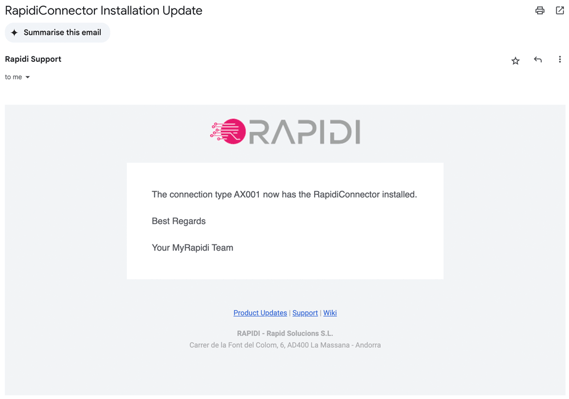
Example 5: Send Emails
Albert can also send emails. It's a straightforward process: ask Albert to "send an email to [email address]," and he will take care of it.
Below is the received message.
Speak with Albert in your language
Hello, hallo, hola, bonjour, hej, buenos días, buongiorno!
If you prefer to communicate in a language other than English, simply start your conversation in that language.
What's New Since Launch
Transfer Management - Now Live
This was the most requested feature at launch, and we're pleased to confirm it's now fully available. Albert can:
- View and manage transfers, including lines, sections, and subtransfers
- Run transfers directly from the chat interface
- Monitor transfer progress with real-time status messages
- Terminate running transfers when needed
- Activate changes to transfer configurations
What was previously display-only is now a complete transfer management experience through Albert.
Skills System - Albert Learns and Specializes
We've built an entirely new skills framework that makes Albert smarter and more specialized. Skills are structured knowledge packages that give Albert focused expertise in specific areas:
- Each skill includes detailed instructions, background information, and evaluation criteria
- Skills can be preloaded onto agents, so your Albert Assistant instantly becomes equipped with exactly the expertise they need
- We have now dedicated skills for Error Troubleshooting, Connections, Schedules etc. - giving Albert deeper diagnostic capabilities than ever before, which transforms into Specialized Agents
- Skills are organized under Areas (domain categories), keeping Albert's growing knowledge base structured and manageable
Specialized Agents
- Connection Manager - Configure and manage your integration connections, authorize services, test connections, and read designs
- Error Troubleshooter - Diagnose and resolve error messages directly from your logs
- Schedule Manager - Set up and manage synchronization schedules
Memory - Albert Remembers
Albert now has persistent memory across conversations. This means:
- Albert remembers your preferences and context between chat sessions
- Memories can be scoped to a specific user, account, service, or agent - so the right context is always available to the right people
- Important memories can be set to preload automatically, ensuring Albert starts every conversation with the context that matters most
- No more repeating yourself - Albert builds understanding over time
Natural Language Scheduling
Setting up schedules just got easier. Instead of configuring technical cron expressions, you can now tell Albert things like:
- "Run this every weekday at 9 AM"
- "Schedule a sync every Monday and Thursday at 6 PM"
- "Run hourly during business hours"
Albert translates your natural language into the correct schedule configuration.
Real-Time Streaming
Albert's responses now stream in real time. You see answers as they're being generated - no more waiting for a complete response before seeing anything. This makes conversations with Albert feel more natural and responsive, especially for longer diagnostic sessions.
Agent Cloning
Need a variation of an agent that's already working well? You can now copy any AI agent with a single action. The copy gets a clear name suffix so you always know which is the original and which is the clone. This makes it easy to experiment with different configurations without having to start from scratch.
MCP Server Integration
Via the Rapidi Model Context Protocol (MCP) Server allows you to connect MyRapidi with external AI tools. This opens the door for Albert to work alongside tools like Claude, ChatGPT, and other AI platforms your team may already use. Currently in active development.
Open Office Hours - Join our upcoming AI-focused sessions to see Albert's latest capabilities in action and ask questions directly to the team.
Refreshed Interface
Albert's entire interface has been redesigned with a cleaner, more modern look across all AI sections - conversations, agent configuration, function management, memories, skills, and more.
What's Coming Next
We're not slowing down. Here's what's on the horizon:
- Continue making Albert AI more powerful - enhancements and refinements for skills, memory, and capabilities for Albert.
- Building your own Agent - Create your own Agent in MyRapidi to address your specific use cases. For now, please reach out to Rapidi Support, specify your requirements and use cases for what your Agent should have in terms of skills and tasks, and we will assist you in setting that up.
What's Next
Join our upcoming Open Office Hours sessions, where we'll showcase Albert's latest capabilities and give you some examples of how you can get the most out of Albert - including transfer management, integration setup, error troubleshooting and a lot morethe new skills system, and AI memory.
Can't attend live? Register anyway, and we'll send you the recording and materials afterward.
Have feedback or feature requests? Reach out to bt@rapidionline.com - your input directly shapes Albert's development.
Read our wiki section on Albert for more details
Frequently Asked Questions
What is Albert, and how does it differ from a regular chatbot?
Albert is an AI agent built directly into the MyRapidi configuration interface. Unlike a standard chatbot that only answers questions, Albert actively executes tasks on your behalf - setting up connections, configuring schedules, running transfers, and troubleshooting errors within your integration environment.
What can Albert do with transfers now?
Albert now has full transfer management capabilities. You can ask Albert to view and manage transfers, including lines, sections, and subtransfers, run transfers directly from the chat, monitor transfer progress in real time, terminate running transfers, and activate changes to transfer configurations.
What are AI Skills and how do they make Albert smarter?
AI Skills are structured knowledge packages that give Albert focused expertise in specific areas. Each skill includes instructions, background information, and evaluation criteria. Skills can be preloaded onto agents, so your Albert instances come equipped with exactly the domain expertise they need. The first dedicated skill is Error Troubleshooting, giving Albert deeper diagnostic capabilities.
Does Albert remember previous conversations?
Yes. Albert now has persistent memory across conversations. He remembers your preferences and context between chat sessions. Memories can be scoped to a specific user, account, service, or agent, and important memories can be set to preload automatically so Albert starts every conversation with the right context.
Can I set up schedules using natural language?
Yes. Instead of configuring technical cron expressions, you can now tell Albert things like "Run this every weekday at 9 AM" or "Schedule a sync every Monday and Thursday at 6 PM." Albert translates your natural language into the correct schedule configuration automatically.
Is Albert still in beta?
Albert has matured significantly since its beta launch in March 2025. With transfer management, the skills system, persistent memory, natural language scheduling, real-time streaming, and a completely refreshed interface, Albert is now a comprehensive integration management assistant. We continue to add new capabilities based on user feedback.
What is the MCP Server integration coming next?
We are building Model Context Protocol (MCP) endpoints that will allow Albert to connect with external AI tools like Claude, ChatGPT, and other AI platforms your team may already use. This is currently in active development and will open the door for Albert to work alongside your existing AI workflow.
Updated May 2026