“The solution provides a reliable and efficient connection between our systems and Salesforce, helping us streamline data flows and reduce manual effort.”
Data integration, configured not coded
Keep your ERP and your CRM agreeing with each other
Pre-built integrations for Microsoft Dynamics, Salesforce and HubSpot. The mapping is configured, not written, so most projects go live in weeks.
Rapidi is data integration and replication software for Microsoft Dynamics, Salesforce and HubSpot. Salesforce partner since 2007.
- Orders reach the ERP without being re-keyed
- Sales sees live stock and order status
- Finance closes without chasing
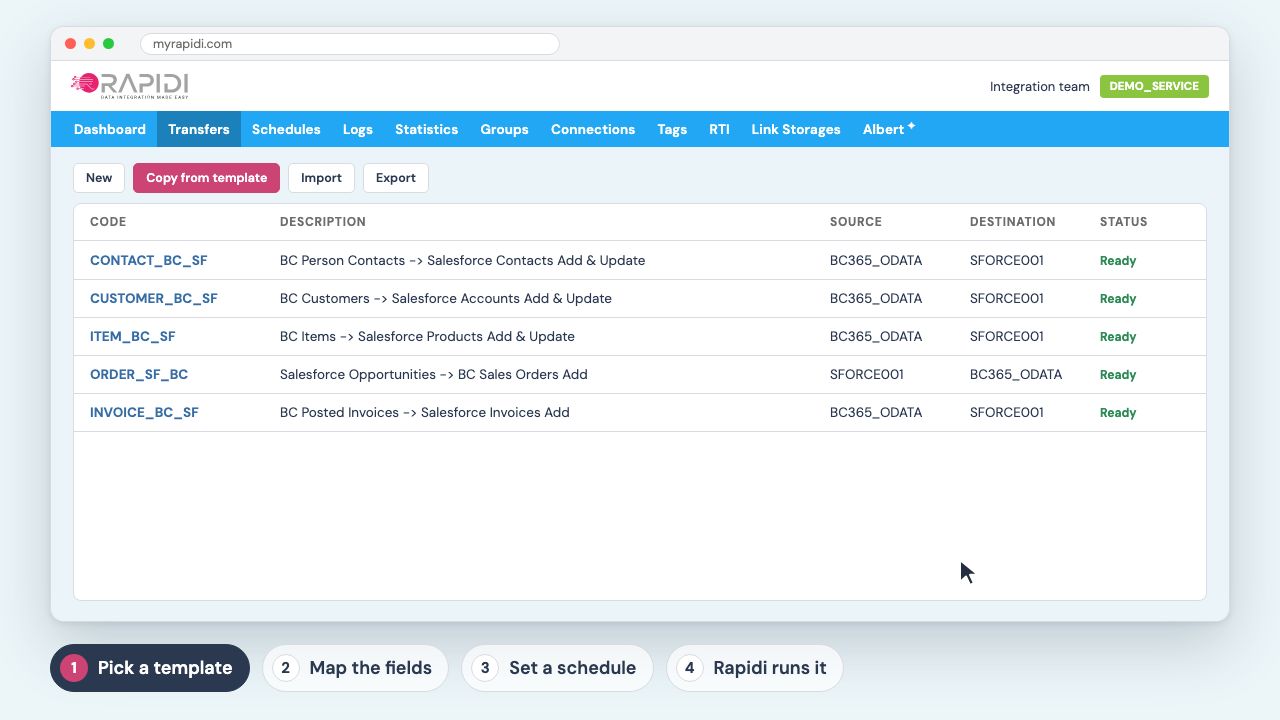
Rapidi is data integration and replication software for Microsoft Dynamics, Salesforce and HubSpot. Microsoft partner since 1987, Salesforce partner since 2007.
 4.95 / 5
 4.8 / 5
 5.0 / 5
What changes once the two systems agree

One view of the customer
See all the customer data you need in one place, including order history, business changes and relationship development.

Better decisions
Improved data access means superior decision making, across your business, from supply chain to sales pipeline.

No more re-keying
No more manual data-entry. No more errors. No more duplicates. Better customer service.

Everyone on the same data
Synchronized data across your in-house and remote teams, even during downtime.
Trusted by fast-scaling companies moving mission-critical data securely and efficiently

























- Expedeon



- Inter-Data








- ReadSoft




What customers say
“We have been using Rapidi for approximately six years and have been very happy with their service.”
“We have been using Rapidi since around 2003, back when our organization operated servers all over the world across more than 30 companies.”
“Tool is easy to maintain and set up (new) integrations”
“Fast, Secure No‑Code HubSpot↔Microsoft Dynamics Sync with Prebuilt Connectors”
“I have been using Rapidionline since 2014 in one company and decided to implement it again in a new organization from 2023 onwards.”
“Throughout the years, Rapidi has made it easy to maintain smooth data flows between Salesforce and Microsoft Business Central with minimal effort.”
“The capabilities it offers to synchronise data between different types of sources allow us to maintain best-in-class master data, improving the overall quality of our data and reporting systems.”
“Unlike other integration platforms, you have visibility of the flows and connectors to the extent you can change/update easily.”
“Rapidi is a reliable, user-friendly, and low-maintenance solution.”
“Their team is responsive, knowledgeable, and always willing to go the extra mile to ensure seamless integration between Salesforce and Business Central.”
“We are quickly expanding how we use the integration since our original implementation was so successful.”
“We needed to bring GP data into Salesforce and Rapidi allows us to do that on a flexible daily/hourly schedule.”
“The smooth connection between systems has saved us time and money, making us more efficient and profitable.”
“Super fast response and timely closing of requests.”
“Robust data integrator product that is easy to set up, configure, and monitor.”
“The entire implementation process from start to finish was extremely well handled.”
Every system we connect, we connect all the way.
Prebuilt templates for the systems on this list, plus generic database, ODBC and REST access for everything else. So the list is not the limit.
 Dynamics 365 Business Central
 Dynamics 365 Finance and Operations
 Dynamics NAVDynamics GPDynamics C5
 Oracle NetSuite
 Salesforce
 HubSpot
 Dynamics 365 Sales
 Workday
 Dayforce
 Storyblok
 Stripe
 Lotus Notes and Domino
 Microsoft SQL Server
 MySQL
MySQL Oracle Database
 IBM DB2
 SQLite
 Google BigQueryAPIREST Web Service
 ODataODBCGeneric ODBC
How it works
You pick a template for the two systems you are joining. You map the fields you care about in RapidiOnline, using a screen rather than a script. You set a schedule, from every few minutes to overnight. Rapidi runs it and tells you when a record does not land.
A developer is only needed where a system has no standard interface. Everything else is configuration, which is why the people who maintain it are usually the people who use it.
Who this is for
Finance
Close without chasing invoices between two systems.
See the pages for financeSales operations
Give the team live stock and order status inside the CRM.
See the pages for sales operationsIT and integration
Retire the custom code you are the only person who understands.
See the pages for it and integrationThe questions people actually ask
Can Rapidi handle logic beyond a one-to-one sync?
Yes. Multi-step transformations, conditional mapping rules and calculated fields are all set up in the integration layer. You apply business rules and validation through the visual mapping interface, without writing code.
Does it sync in real time, or only on a schedule?
Both. Salesforce Outbound Messages and Dynamics 365 webhooks trigger a sync the moment a record changes. You choose per object: real time for orders and customer updates, scheduled for bulk work like price lists.
What happens when a record fails?
The MyRapidi dashboard shows which records failed, why, and what to do, in business terms rather than technical logs. Failed records are queued for retry automatically, and you can route alerts to email, Slack or Teams.
Can it connect more than two systems?
Yes. One Salesforce org can sync with several separate Business Central environments at once, across countries or business units, each with its own rules, mappings and schedule, from one console.
Can it reach a system inside our network?
Yes. RapidiConnector reaches a system inside your network without opening it to the internet, so on-premise and cloud systems can be joined.
What does it cost?
Rapidi is priced per subscription plan rather than per connector, so adding another system does not change the licence.
Talk it through with someone who has done it
Bring the two systems and the records you need joined. We will tell you whether a template covers it.