New Advanced Features Section Under Transfers (February 2015)
Navigating the Transfer section in MyRapidi and getting an overview of what a Transfer does, can sometimes be hard as there is a lot of settings you can do on each Transfer.
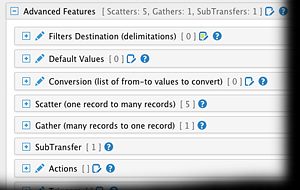
We took some good steps with the December 2014 release of MyRapidi cleaning up the user interface.Now we have taken another step and moved a number of sections with their functionality into a new section called "Advanced Features".
Under this new section you will now find:
- Filters Destination
- Default Values
- Conversion
- Scatter
- Gather
- SubTransfer
- Actions
- Triggers
- Sorting Source Table
- Sorting Destination Table
- Special Setup
The reason for that is to give you a cleaner interface to work with and to hide away functionality that you do not need on a daily basis.
To be sure that you have a good overview with the new section, we compose a summary in the header of the "Advanced Features" section summarizing the settings that are filled in below in this section.
As always, we would love to hear from you - feel free to leave a comment on this below, we always thrive to make MyRapidi better to improve your working routine with it.
