
Google BigQuery Salesforce Integration Guide for SMBs
Integrating Google BigQuery with Salesforce allows sales and customer success teams to access key insights directly in Salesforce by syncing data from BigQuery, enabling real-time insights and faster decision-making without switching tools.
Usually, in most businesses, Sales and Customer Success teams live in Salesforce. But many of the signals they need sit in BigQuery. Are your sales and customer success teams struggling to access the data they need to make informed decisions? Then this article is for you!
This article explains how to sync and integrate Google BigQuery with Salesforce so teams can act on insights inside the records they already use.
Integrating BigQuery → Salesforce with Rapidi allows you to:
- Give Sales & CS context-rich insights where decisions happen
- Reduce manual reporting and eliminate siloed dashboards
- Improve renewals, expansion success, and customer prioritization
- Build a repeatable intelligence-to-action system across the organization
This article includes:
- What Google BigQuery is and what it’s used for
- What Salesforce is and why it matters for execution
- Why integrating Salesforce with BigQuery helps Sales and Customer Success
- What types of insights teams typically write back into Salesforce
- Benefits of a BigQuery Salesforce integration
- A practical overview of how Rapidi delivers the sync without custom development
Let's dive in.
Setting the Stage and Why This Matters
Many organizations store critical analytics and customer intelligence in BigQuery, including product usage and renewal insights, revenue performance, and lifecycle indicators.
Meanwhile, Sales and Customer Success teams operate inside Salesforce.
By syncing insights from BigQuery → Salesforce, you ensure teams can act on data when they need it, without switching tools, exporting spreadsheets, or interpreting reports.
What is BigQuery
BigQuery is Google's cloud data warehouse designed for analyzing massive datasets. While traditional databases slow down when you query millions of records, BigQuery handles billions of rows in seconds.
Key capabilities:
- Speed at scale: Query 100 million records as fast as 1,000. No performance degradation with data volume.
- Cost model: Pay only for the data you query, not for storage or computing power sitting idle. A query scanning 50GB costs about $0.25.
- Machine learning built in: Build predictive models using SQL. No separate data science platform required.
- Integration-ready: Connects to business intelligence tools, data pipelines, and operational systems through standard APIs.
Companies use BigQuery to analyze data from multiple sources. Your product analytics, support tickets, billing records, and CRM data can all live in one place and be queried in a unified way.
What is Salesforce
Salesforce is the CRM platform that many companies use to manage customer relationships. Sales teams track opportunities, customer success teams monitor account health, and support teams resolve cases.
Core functions:
- Sales management: Pipeline tracking, opportunity management, forecasting, and deal progression
- Customer success: Account health monitoring, renewal management, support case tracking
- Service operations: Case management, knowledge bases, service level agreements
- Marketing automation: Campaign management, lead scoring, email tracking (with Marketing Cloud)
Salesforce excels at daily operations but wasn't built for heavy analytics. Reports work well for the current-quarter pipeline or for last month's closed deals. When you need deeper analysis across years of data or want to join CRM data with other business systems, you hit limits.
What is BigQuery Salesforce Integration
The BigQuery Salesforce Integration lets you move Salesforce data into Google BigQuery so you can run analytics, build dashboards, and combine CRM data with finance, product, and support data in one place.
BigQuery Salesforce Integration connects Salesforce CRM data to Google BigQuery to support faster reporting, better forecasting, and shared metrics across teams.
For IT Managers, VPs of Operations, and CEOs, the aim is a single trusted view of pipeline, revenue, retention, and service performance.
Why integrate Salesforce with BigQuery
Salesforce is where teams take action. BigQuery is where your data becomes insight. Connecting them puts the right signal on the right record so people can decide faster.
What Salesforce gives you
- A single place for customer records
- Pipelines, activities, and account history
- The workflows your teams already follow
What BigQuery gives you
- Fast analysis across large datasets
- Signals from product, billing, support, and marketing
- A consistent way to calculate scores and segments
What you Achieve when you connect them
- Write insights back to Accounts, Contacts, and Opportunities
- Reduce dashboard hopping and spreadsheet exports
- Keep teams aligned on the same definitions
How it helps Sales
- Prioritize accounts based on real signals
- Spot expansion opportunities earlier
- Improve forecast inputs with better data
How it helps Customer Success
- Put health and risk indicators on the Account record
- Trigger playbooks when adoption drops or risk increases
- Move faster before renewals become urgent
What Types of Insights Can Be Brought Into Salesforce?
Organizations commonly bring into Salesforce:
| Category | Business Meaning | How Teams Use It |
|---|---|---|
| Customer Engagement Signals | How actively customers are using the product | Prioritization for outreach & support |
| Commercial Segmentation | Strategic, growth, keep-stable, or at-risk | Account planning & territory focus |
| Predictive & Propensity Scores | Likelihood of renewal or expansion | Forecast accuracy & proactive retention |
| Lifecycle / Onboarding Status | Where customers are in their adoption journey | Automated workflows & timely check-ins |
These values appear directly on Account, Contact, Opportunity, and/or custom objects, so teams see them where they work.
Salesforce - BigQuery Integration: A Simple Use Case
Before integration:
CSM sees the Account record in Salesforce, but has no context about product usage or renewal health. They must check dashboards, exports, or Slack messages.
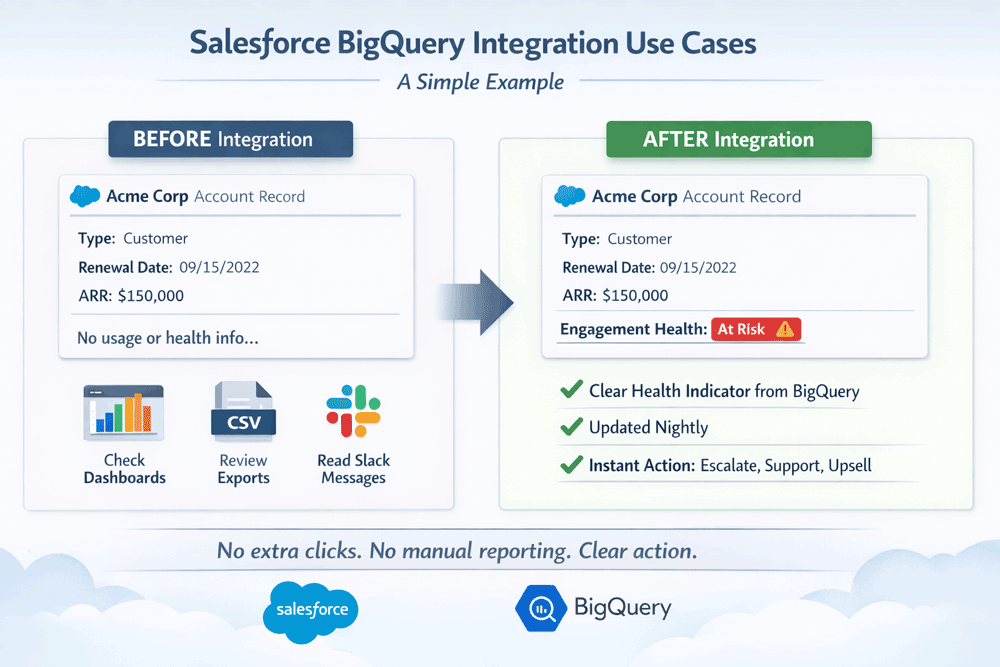
After integration:
The Account record shows a clear “Engagement Health” indicator. Updated on a schedule from BigQuery → Salesforce. Now, the CSM instantly knows whether to escalate, support, or upsell.
No extra clicks. No manual reporting. Clear action.
The BigQuery Connector Works Across Your ENTIRE TECHNOLOGY Stack
Once insights live in BigQuery, those same models can support:
| System | What It Gains |
|---|---|
| HubSpot CRM | Smarter segmentation for nurturing & targeting |
| Dynamics 365 Finance | Renewals indicators and ARR categorization |
| Dynamics 365 Business Central | Customer tier, lifecycle stage, revenue health |
| Microsoft Dynamics 365 Sales | Customer maturity indicators + expansion triggers |
BigQuery becomes the intelligence hub. Salesforce becomes the execution hub.
Benefits of BigQuery Salesforce Integration
- Put insight where action happens
Scores and segments show up on the Salesforce record. - Reduce manual reporting
Less exporting. Less chasing dashboards. - Improve prioritization
Sales focuses on the right accounts. CS focuses on risk and expansion signals. - Standardize decision inputs
One model in BigQuery. One set of fields in Salesforce.
Step-by-step Guide: How Rapidi makes the BigQuery - Salesforce Integration Work (Simple & Reliable)
Rapidi connects BigQuery → Salesforce without custom development, scripting, or pipelines.
1. Rapidi Connects to BigQuery Using ODBC
Rapidi uses a secure ODBC driver to read tables or materialized views in BigQuery.
- You control exactly which insights are pulled, not the entire warehouse
- Works with existing data models, no restructuring required
2. Rapidi maps the data to Salesforce Objects
Data can be sent to:
- Accounts
- Contacts
- Opportunities
- Custom objects / scoring objects
Mapping is configuration-based (no Apex, middleware scripts, code).
3. Automatic Incremental Updates
Rapidi detects what has changed in BigQuery since the last sync.
- Only new or updated values are sent
- Schedule frequency: near real-time, hourly, nightly, or custom
4. Built-in Error Handling & Monitoring
- Retries, notifications, and reconciliation are automatic
- No manual “watch and fix” effort needed
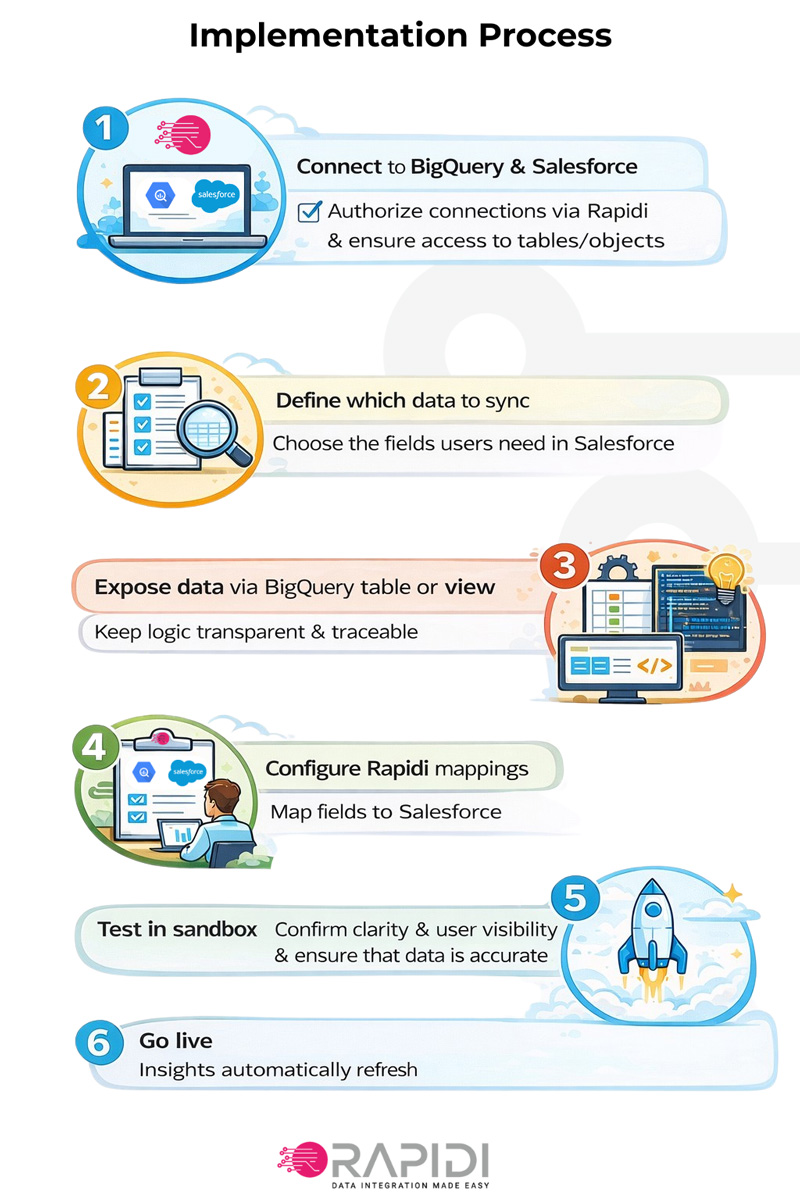
Quick Implementation Overview
| Step | Task |
|---|---|
| Connect to BigQuery and Salesforce | Authorize the connection and ensure that you have access to the needed tables/objects |
| Define which data to sync | Choose the fields users need in Salesforce |
| Expose data via a BigQuery table or view | Keep logic transparent and traceable |
| Configure Rapidi mappings | Map fields to Salesforce |
| Test in sandbox | Confirm clarity and user visibility, and ensure that data is accurate |
| Go live | Insights automatically refresh |
Conclusion
When you integrate BigQuery with Salesforce, you move from “data in dashboards” to “data in the workflow.” Your teams stop guessing. They see engagement, risk, and growth signals directly on the Account, Contact, and Opportunity records where they make decisions. The result is fewer manual reports, clearer prioritization, and playbooks that run from one shared source of truth. If you start with a small set of high-impact fields, validate in a sandbox, then scale to more use cases, you build a repeatable intelligence-to-action loop that improves renewals and expansion over time.
I hope you found this article helpful and included some practical steps to move forward at your company. For a deeper walkthrough on how Rapidi can help you with your integration project, please get in touch with us today!

Updated March 2026
Frequently Asked Questions (FAQ)
What is BigQuery Salesforce Integration?
BigQuery Salesforce Integration is the process of syncing Salesforce CRM data into Google BigQuery so you can analyze CRM data alongside other business data for reporting, dashboards, and modeling.
Why do Sales teams need BigQuery Salesforce Integration?
Sales teams use BigQuery Salesforce Integration to analyze pipeline trends, stage conversion, rep activity impact, and forecast accuracy at scale, without relying on manual exports.
Why do Customer Success teams need BigQuery Salesforce Integration for Sales and Customer Success teams?
Customer Success teams use BigQuery Salesforce Integration for Sales and Customer Success teams to build health scores, renewal risk signals, and expansion insights by combining Salesforce data with product usage, support, and billing data.
How often should Salesforce sync to BigQuery?
Many companies start with daily or hourly loads. Increase frequency only for objects that drive operational decisions, such as Opportunities and Cases.
What data should I integrate first?
Start with Accounts, Contacts, Opportunities, Opportunity Line Items, Users, and Cases. Add history data early if forecasting and churn analysis matter.
Do I need near-real-time integration?
Not always. Hourly or daily freshness is enough for many executive dashboards. Near-real-time makes sense for alerting, SLA tracking, and fast health scoring.
What tools can be used to integrate BigQuery and Salesforce?
You have a few common options, depending on volume, governance, and how much control you want.
Reverse ETL tools
- Push modeled tables or views from BigQuery into Salesforce objects and fields
- Best when BigQuery is the source of truth for segments, scores, and prioritization
- Salesforce Data Cloud connectors (useful if you already run Data Cloud)
- MuleSoft options (useful if you already run MuleSoft)
- Integration platforms can read BigQuery using ODBC/JDBC connectivity and write to Salesforce
- Best when you want configurable mappings, schedules, and monitoring
- Query BigQuery
- Transform to a Salesforce-ready shape
- Upsert into Salesforce via APIs
- Monitor, retry, and reconcile