Microsoft dynamics integration

1 Step Upgrade from Dynamics NAV to Dynamics 365 Business Central
Upgrading from older versions of Microsoft Dynamics NAV to the latest Dynamics 365 Business Central can be daunting, especially if you need to jump several versions all at once, migrate large volumes of data, or accommodate custom objects.
Read the article →
MS Dynamics GP end of life - what about integration? Rapidi can help!
As you maybe already know, since April 2023, Microsoft announced that Dynamics Great Plains (Dynamics GP) sales will end in 2026 and the support will end in 2028.
Read the article →
Cross Reference Keys Made Easy with the New Link Storage Feature
We are very happy to introduce you to our brand new Link Storage feature which lets you store, maintain and use Cross Reference Keys in an easy and straighforward way.
Read the article →
Hybrid Service Installation - the Best of On-Demand and On-Premise
We are very happy to introduce you to the new Hybrid Service deployment for RapidiOnline. With this release it got much easier to deploy the RapidiOnline Service as a Hybrid Service installation.
Read the article →
Character Sets and Conversion with Microsoft Dynamics NAV and MS SQL (3.2.92v)
Handling conversion of characters between different systems using different character sets is always very challenging. If all systems could just work natively with e.g. UTF8 then it would be much easier. But until that is the case, we (as a provider of data integration solutions) have to do our best to handle these things with as little impact for our end users as possible.
Read the article →
Microsoft Dynamics AX 2012 Web Service Updates (3.2.93a)
I am happy to announce a major update to our support for Microsoft Dynamics AX web services. This mainly covers Microsoft Dynamics AX 2012 R1, R2 and R3 (but also some changes for Microsoft Dynamics AX 2009).
Read the article →
Support for 'SkipField' Function with Microsoft Dynamics NAV Web Service Connector (3.2.92u)
Back last sommer we introduced a new function called 'SkipField'. The function can be used as part of the mapping and will cause that Rapidi dynamically can skip sending a specific field (for a specific record) to the destination system. This is very useful
Read the article →
Now Supporting Microsoft Dynamics NAV 2016 (3.2.92z)
We are happy to announce that we now have full support for Microsoft Dynamics NAV 2016.
Read the article →
Transfer Destination Control Field Feature Updated (version 3.2.92i)
We have updated and added some new field-type support to our "Destination Control Field" feature on a Transfer.
Read the article →
Reading FlowFields from MS Dynamics NAV 2013 or later
Reading FlowFields or calculated fields from MS Dynamics NAV just got easier
Read the article →
Major MS Dynamics NAV Web Service Connector Upgrade
We are very pleased to announce that we have done a major update of our MS Dynamics NAV Web service support including brand new features like a one-step Sales Order creation, support for Codeunit Web services and in general better error handling.
Read the article →
MS Dynamics NAV Sales Order Using Web Services Made Simple
When you want to create new Sales Orders in MS Dynamics NAV the obvious choice is to publish the standard Sales Order Page (Page 42) as a Web service and use this Web service to insert the new Sales Orders in NAV.
Read the article →
New Functions SkipField, BlankValue and IsBlank (version 3.2.91v)
I am happy to announce that we now have a few new functions available in RapidiOnline. These new functions serve to optimize your use of formulas in the FieldList mapping so that the formulas in general can be shorter. In this way it will not only be easier to write the formulas, but they are also easier to maintain and it's easier to quickly get an overview of a particular mapping.
Read the article →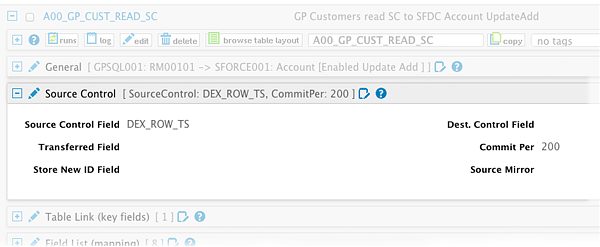
Using DEX_ROW_TS as SourceControl with MS Dynamics GP
When setting up RapidiOnline to transfer data from an ERP system to another system, we always try to find a way to read only the changed records for a given type of data. Some systems have a timestamp column in each table - this is e.g. the case for MS Dynamics NAV. The MSSQL column type timestamp is a number column that is automatically increased on every change to a record in that table by the MSSQL server, which makes it very convenient to detect changes.
Read the article →
CURRENTTIME Formula Now Works With Dynamics NAV Time Fields
The Formula CURRENTTIME generates correct time for use with NAV Time Fields
Read the article →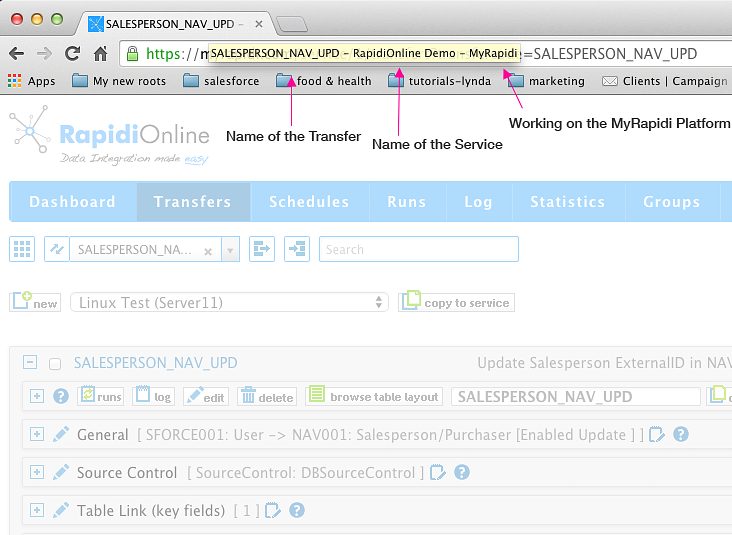
Easier to Navigate Between Multiple MyRapidi Browser Tabs
When working with MyRapidi we often find ourselves having multiple browser tabs or even several browser windows open at the same time. We have one tab with a Transfer that we work on and other tabs with Transfers that we copy stuff from and tabs with Schedules and Connections etc.
Read the article →
MyRapidi Log and Runs Optimized for Faster Response Time
In our ongoing effort to ensure fast response time of the MyRapidi platform we have done some changes to the Filtering and Search functionality under Log and Runs.
Read the article →
MS Dynamics AX Company Filtering with Mirror Fix (version 3.2.91e)
When using our Mirror Technology to read data from MS Dynamics AX, we could in some cases be reading data from all MS Dynamics AX Companies instead of only one Company. This is fixed with this release.
Read the article →Microsoft Dynamics CRM Online fix empty dateTime (version 3.2.89e)
When having Microsoft Dynamics CRM online as destination and having a datetime field in the mapping and the value for this field was set to an empty date, then we got an error back from MS Dynamics CRM saying:
Read the article →MS Dynamics NAV WebService better error handling (version 3.2.88z)
For MS Dynamics NAV WS (WebServices) we have added better error handling for the ReadDesign process. Now we check for SOAP Fault messages and return these properly.
Read the article →MS Dynamics NAV SQL insert into tables with AutoIncrement fields (version 3.2.88y)
If inserting new records into MS Dynamics NAV SQL tables with an AutoIncrement field and not having the field in the Field List, then an error was returned, that you cannot insert 0 into an identity field. This was because we supply default values for all fields that are not mapped.
Read the article →MS Dynamics CRM 2013 fix writing empty option value (version 3.2.88s)
MS Dynamics CRM 2013: Fixing problem with sending empty value for option and ref/guid field. Now sending xsi:nil="true" attribute.
Read the article →MS Dynamics CRM 2013 and Salesforce.com communication fix (version 3.2.88r)
MS Dynamics CRM 2013
Read the article →MS Dynamics CRM 2013 fix errors inserting data (version 3.2.88q)
MS Dynamics CRM 2013
Read the article →MS Dynamics CRM 2013 optimizations and new features (version 3.2.88b)
MS Dynamics CRM 2013 fixes and additional features:
Read the article →MS Dynamics CRM 2013 support ExecuteMultiple (version 3.2.87v)
For MS Dynamics CRM 2013, we now support the ExecuteMultiple method for Create, Update and Delete. ExecuteMultiple allows to send several records (Create, Update or Delete's) to CRM in one request and it greatly increases speed !
Read the article →