

Rapidi's Slack Integration: How to Keep Your Team in the Loop through Slack
With Rapidi's integration to Slack you can receive messages from MyRapidi into your Slack Workspace. If your daily work happens a lot inside Slack you can now also receive important updates into different Slack channels instead of receiving them only via email.
Read the article →
MyRapidi Albert AI: Assistance for your integration work
When we introduced Albert in 2025, it was a bold step: an AI assistant that didn't just answer questions but actually executed tasks within your MyRapidi interface. Nearly a year later, Albert has grown from a promising beta into a comprehensive integration management assistant. Here's everything that's new.
Read the article →
How does Microsoft Dynamics 365 Sales integrate with Business Central?
Dynamics 365 Sales integrates with Business Central by connecting CRM and ERP data, allowing sales and finance teams to share customers, contacts, orders, and financial information in real time, improving accuracy, visibility, and workflow efficiency.
Read the article →
Support Is Now Built Into MyRapidi
In our ongoing effort to provide our customers with a better experience when submitting support tickets, we have now moved our support system to MyRapidi. From today, support is built directly into MyRapidi. You will be able to see your submitted cases within the same system you use for your integration setup.
Read the article →
How to monitor Logs, Runs, Data Errors, Groups & Schedules in Real Time?
We've completely rebuilt how Rapidi displays live information from your integrations. Instead of manually refreshing pages or waiting for periodic updates, you now see changes as they happen.
Read the article →
Stay Updated: Rapidi Product Release Notes Now Live!
We’re pleased to share that the MyRapidi Product Release Notes are now publicly available in our Wiki Documentation.
Read the article →![[WEBINAR REPLAY] Salesforce and Salesforce Integration](/sa/yvp2qer43gh52m6d1fxis23di31g/salesforce-salesforce-integration.jpeg)
[WEBINAR REPLAY] Salesforce and Salesforce Integration
Do you have several Salesforce instances or organizations that need to be integrated? Or do you need to migrate your data from one Salesforce org to another org. Then Rapidi makes this task easy for you. Join us for our
Read the article →![[Webinar Replay] Integrate Salesforce & MS Dynamics 365 Finance](/sa/oq2v24y0e3wxx4q746mvi3mllh3m/webinar-sf-finance-integration-pu.jpeg)
[Webinar Replay] Integrate Salesforce & MS Dynamics 365 Finance
Watch our on-demand webinar where we'll delve into the benefits but also challenges of integrating Salesforce with Microsoft Dynamics 365 Finance. We will also demonstrate how data resides inside Salesforce once it has been integrated with MS Dynamics 365 Finance.
Read the article →
WIKI - Improved Rapidi Documentation with Full-text Search
The MyRapidi Wiki documentation now with improved full-text search functionality: The MyRapidi Wiki documentation, integrated into the Rapidi platform, you can quickly access it by clicking the question mark icon (?) on any page or via the top-right menu. The enhanced wiki features an integrated search function that lets you scan for topics across all pages.
Read the article →
HubSpot - MS Dynamics 365 Business Central Integration
Are you looking to integrate HubSpot CRM with Microsoft Dynamics 365 ERP (Business Central, Finance)? Then we have the solution for you.
Read the article →![How To Find Documentation on MyRapidi [Quick Tip]](/sa/6bdqz5lczijrz4x3ng9ggeck34gl/wiki-doc-help.jpeg)
How To Find Documentation on MyRapidi [Quick Tip]
Whether you’re a seasoned MyRapidi veteran or a freshly minted user, this post will undoubtedly help you navigate to useful documentation drawn from our vast repository of resources that we’ve compiled to expand your knowledge and understanding of RapidiOnline’s data integration platform.
Read the article →
MS Dynamics GP end of life - what about integration? Rapidi can help!
As you maybe already know, since April 2023, Microsoft announced that Dynamics Great Plains (Dynamics GP) sales will end in 2026 and the support will end in 2028.
Read the article →![[Webinar Replay] An Introduction to MyRapidi - March 2024](/sa/buv817vcnljymiqqu5d34gohq2vk/myrapidi-intro-blog-2.jpeg)
![[Webinar Replay] MyRapidi Product Update Webinar March 2024](/sa/vmaz76jp7b4xjbeyga4ifwcmj8rd/product-updates-webinar-03-24-video.jpeg)

Walkthrough of MyRapidi Configuration Interface
Hello, and welcome to today's session. I will walk you through the Rapidi Data Integration Solutions and what we can do when it comes to, data integration projects.
Read the article →
How to uninstall the RapidiConnector locally
In order to uninstall a RapidiConnector locally, you would need to go through the following steps:
Read the article →
Update on how to enable Passkeys on MyRapidi
Please note: This blog post has been updated to a newer version please read this blog post: Passkeys: Easy, strong, and secure authentication
Read the article →
How to connect to MS Dynamics 365 CRM OData with OAuth2
To connect to MS Dynamics 365 CRM OData with OAuth2, register an application in Azure AD, get the Application ID and Client Secret, set up an application user in your CRM environment, and configure the connection in Rapidi using OAuth2 and your CRM URL.
Read the article →
Benefits of the new RAPIDI Hosting Platform
From October to December 2022 all Rapidi customers were moved to Rapidi's new hosting platform. In this blog post, we would like to give you a short overview of the platform and what benefits we see from using the new hosting platform.
Read the article →
Transfer Fields, SFDC API Calls, Comments, and Mirror Technology
Rapidi’s best data integration tools like Central Rapidi Service and RapidiConnector have evolved through continuous feature improvements that minimize errors, improve data warehousing collaborations, and add functionality to legacy systems through Mirror technology.
Read the article →
Feature: Continue on Error
In this blog post, we will go through the 'Continue on Error' feature and the 'Data Errors' page under the 'Logs'.
Read the article →
Runs Page Explained
This is an update on our latest changes on the Runs Page. A while ago we published this blog post about our newly resigned page on Logs, Runs, and Data Errors. Since then we have been working on improving the use of Logs data even more, in particular, we have done improvements to the Runs page.
Read the article →
VIDEO: MyRapidi Product Update Webinar February 2022
We recently held our MyRapidi Product Update Webinar, where we walked through several new features and improvements on our data integration platform.
Read the article →
Webinars: MyRapidi Product Update February 2022
MYRAPIDI PRODUCT UPDATE WEBINARS 2022 Learn about the latest features on the MyRapidi integration platform and gain insights, tips, and tricks from the experts. Sign up today and save your seat!
Read the article →
Overview of Logs, Runs & Data Errors
With our latest release of MyRapidi, we have done some changes to the Logs page.
Read the article →
Schedules in 5 different ways
With our latest release of MyRapidi, we have done some changes to the Schedules page.
Read the article →
Switching to the new version of MyRapidi on Sunday 13, 2021
Switching to the new version of MyRapidion Sunday, June 13, 2021 We are pleased to announce that on Sunday, June 13, 2021 (10 am CET, 4 am EST, 1 am PST), we will be switching to the new version of MyRapidi.
Read the article →
Get more out of Statistics on MyRapidi
We are pleased to announce that our newly refined and improved statistics pages are available on app5.myrapidi.com. We have been asking you about your opinion on our statistics pages and we have listened to your suggestions and redesigned the statistics pages. The ancient statistics pages only showed tabular data and it was not easy to get the sense out the data displayed. The redesigned pages now include multiple graphs from the underlying tabular data (still available under Transfers Statistics and Data Statistics). The main goal for the redesign was to display data that you would be able to understand and act on in order for you to optimise your integration setup to ensure that data is transferred in an efficient and timely manner.
Read the article →
VIDEO: MyRapidi Product Update Webinar January 2021
We recently held our MyRapidi Product Update Webinar, where we walked through several new features and improvements on our data integration platform.
Read the article →
Webinars: MyRapidi Product Update January 2021
Learn about the latest features on the MyRapidi integration platform and gain insights, tips and tricks from the experts. Sign up today and save your seat!
Read the article →
Improved Schedule Monitoring
In our latest release, which came out this past Sunday, we have improved the monitoring of your Schedules in your MyRapidi Configuration interface.
Read the article →
New Release of the MyRapidi App
Dear Rapidi User, you might have noticed that we have been somewhat quiet all these pasts months, but we have been working intensively on the new release of the MyRapidi Configuration Interface and even-though it is still in BETA we invite you to start using it on app5.myrapidi.com. The new version and the current version will be running in parallel during the BETA period and you can always use the current version in case you prefer.
Read the article →
Microsoft Dynamics 365 Business Central - Salesforce Standard Integration
We are pleased to announce that we offer a standard solution for integrating Salesforce.com and Microsoft Dynamics 365 Business Central
Read the article →
VIDEO: MyRapidi Product Update Webinar March 2019
We recently held our (annual :)) MyRapidi Product Update Webinar, where we walked through several new features and improvements on our data integration platform.
Read the article →
Webinars: MyRapidi Product Update March 2019
Learn about the latest features on the Rapidi platform and gain insights, tips and tricks from the experts. Sign up today and save your seat!
Read the article →
New Feature: The Activity History in MyRapidi
In our latest release of the 29th of July, 2018 we also released the first version of the 'Activity History' page (under Settings > Account Settings). The 'Activity History' allows you to track the activity on your entire Account. We have now refined it and have released the latest version of it on the 1st of September 2018. The 'Activity History' has been a wish from many of you.
Read the article →
How to enable Two-factor Authentication (2FA) on MyRapidi
We are happy to announce that now you are able to use Two-factor authentication on MyRapidi. Below we will explain in more details what two-factor authentication is, what supported in MyRapidi and how to set it up.
Read the article →
ACTION REQUIRED: New Rapidi Service Access Management
We are pleased to announce our new Rapidi Service Access Management feature. With this new release we have totally re-worked the way we manage and control access to the Rapidi Services. The access to a Rapidi Service is now much more fine-grained and flexible. Access levels range from a pure 'read-only' access to having edit rights in all areas and you can control edit access to the different areas of the MyRapidi application.
Read the article →
Setting up Schedules with Tags
In this blog post we will walk you through how you setup your Schedules with Tags and how you can add the Tags description to your existing Schedules.
Read the article →
Webinars: Rapidi Product Update January 2018
Learn about the latest features on the Rapidi platform and gain insights, tips and tricks from the experts. Sign up today and save your seat!
Read the article →
Recap of MyRapidi Product Update Webinar January 2017
We recently held a webinar on news, tips and tricks on the MyRapidi data integration platform, where we walked-through several new features from our latest RapidiOnline releases. The main topics were the RapidiConnector, the Link Storage feature (aka key cross-referencing), the Hybrid Server installation and other new features and improvements that will help you become more efficient and more effective with your daily work with your RapidiOnline Service.
Read the article →
Webinars: MyRapidi Product Update January 2017
Would like to learn how to work with MyRapidi in the most efficient way?
Read the article →
'Activate Changes' feature improved and MyRapidi interface improvements
In this blog post we have accumulated a few feature updates that might be very useful to you. Please read on to learn more...
Read the article →
New Feature: Transfer Status
Working with your transfers inside MyRapidi can sometimes get overwhelming when you have many different transfers on different stages - meaning that you might have transfers that are running live, some you still have in test, others that you still are working on or some that you don't use anymore.
Read the article →![RapidiOnline Service Type & Edition [Quick Tip]](/sa/eyr1sv7m935jr6nixh9jc5yu10aw/color_profiles.jpeg)
RapidiOnline Service Type & Edition [Quick Tip]
We are thrilled to announce some new visual enhancements for our customers and partners leveraging RapidiOnline.
Read the article →
MyRapidi Webinar: News, Tips & Tricks on Late Summer Release 2015
Just a reminder for all our customer and partners about our MyRapidi Webinar which we would like to invite you to.
Read the article →
Webinar: MyRapidi Configuration Interface - News, Tips and Tricks
Work with your RapidiOnline Service like a Pro Would like to learn how to work with MyRapidi in the most efficient way? Would you like to get updates on new features and gain insights, tips and tricks from the experts?
Read the article →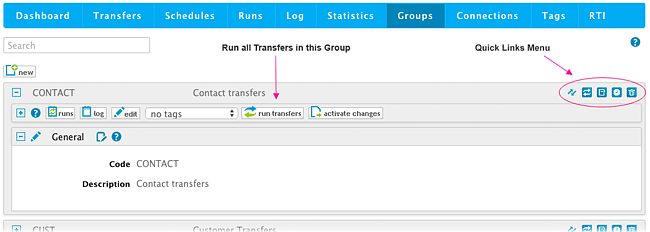
New MyRapidi Feature on Groups: Run a Group of Transfers
We have been listening to your requests and we are proud to announce a new feature on MyRapidi: Run a Group of Transfers. This new feature will enable you to run an entire group of Transfers at once.
Read the article →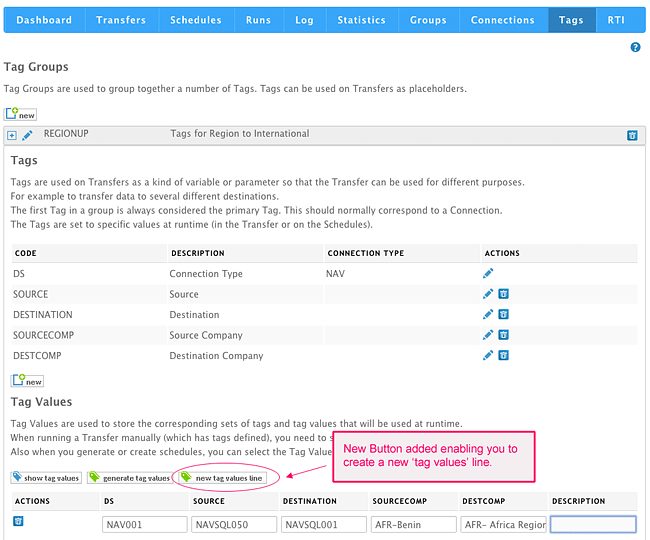
Improved Flexibility Working With MyRapidi Tags: Generate a Single 'Tag Values' Line
We now have added more flexibility into the Tags section as some customers use Tags differently from what was originally intended.
Read the article →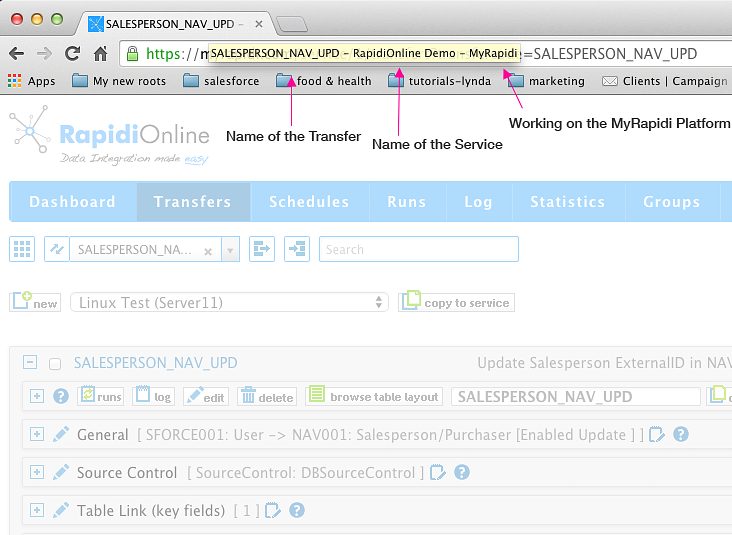
Easier to Navigate Between Multiple MyRapidi Browser Tabs
When working with MyRapidi we often find ourselves having multiple browser tabs or even several browser windows open at the same time. We have one tab with a Transfer that we work on and other tabs with Transfers that we copy stuff from and tabs with Schedules and Connections etc.
Read the article →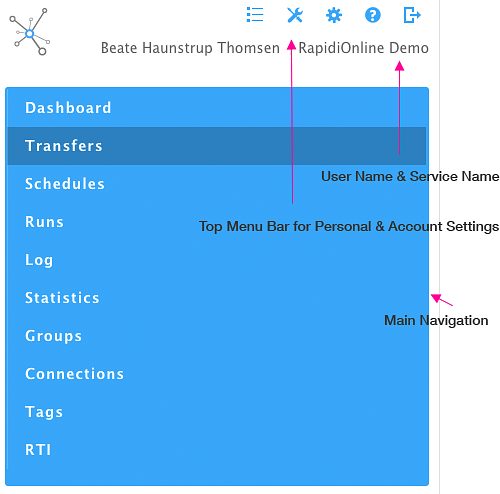
Navigation Optimized for Mobile Device
The Navigation on Myrapidi is now optimized for mobile devices - and it should now be easier to access the information needed.
Read the article →
New Comment Editor Feature on Transfers (Beta - February 2015)
Horay - it is a pleasure to tell you about this new feature that we have added to MyRapidi. Currently the Comment Editor is released in Beta version which means that you can use it as it is, but there will be changes to the functionality - we would really like your feedback on this, so please try it out and let us know what you think. Simply just post a comment below. Documentation and More The goal with the new comment editor feature is mainly for documentation purposes where you as a admin or user can document and describe processes and actions etc. either just for yourself but certainly also for other users. Currently the Comment Editor gives you the possibility to add comments under the Transfers section. By clicking on the Comment icon it opens up a window where you can view and search comments listed by author and date. You can also add new comments. The comment icon will indicate if there are some comments - if there are, it is filled with green text. When you hover or go over the icon it shows how many comments there are.
Read the article →