How to set up the Salesforce Integration User
The Salesforce Integration User License provides a dedicated, API-focused account for system-to-system integrations. To set it up, create a new user in Salesforce, assign the Integration User License, and use it for API-only access to your integrations. This ensures secure, reliable, and cost-effective connections without relying on regular interactive accounts.
Table of concepts
- What is the Salesforce Integration User License?
- What are the key benefits of the Salesforce Integration User License?
- How to Assign the New Salesforce Integration User License to Grant API Only Access
- How to Set Up and Configure an Integration User in Salesforce?
What is the Salesforce Integration User License?
The Integration User License was unveiled by Salesforce at the recent TrailblazerDX, Salesforce Developer Conference and is available from March 14, 2023. It is designed specifically for system-to-system integrations, providing a cost-effective way to connect external systems seamlessly with Salesforce.
Key points:
-
Dedicated Salesforce account for integrations
-
API-focused, not for interactive login
-
Reduces security risks compared to using regular accounts
What is an Integration User?
An Integration User can be an Admin’s best friend. It is a dedicated (not used by any human) full Salesforce license that has a custom Profile, Permission Set and is used for any 3rd party integrations like marketing automation, CTIs, data enrichment tools, and even your own custom API work that ties in with your instance.
Integration Users are particularly important for the tools listed above because they tend to update thousands (or tens of thousands) of records a day and have a huge impact on your instance.
In short, having an Integration User is a more secure, auditable way to move data into and out of your instance without relying on an existing user’s license.
The main benefits of having a dedicated integration user are around improving data integrity, simplifying reporting, and increasing instance security - and you save a extra salesforce seat.
What are the key benefits of the Salesforce Integration User License?
In the era preceding this introduction, the necessity to acquire a complete Salesforce license for each integration user was the norm. This posed significant financial implications, especially when multiple integration users were required.
However, the landscape has changed. Key points of the new model include:
-
Free licenses: Organizations using Performance, Enterprise, or Unlimited editions can access five Salesforce Integration User Licenses at no cost.
-
Affordable additional licenses: Any additional licenses beyond the first five are priced at $10 each, making scaling cost-effective.
-
Enhanced security: The Integration User is designed to prevent access to instance functionality or data via the user interface, minimizing the risk of unauthorized access.
-
Built-in data protection: Organizations benefit from robust security by default, without incurring additional financial burdens.
This revolutionary model allows organizations to securely integrate multiple systems while keeping costs low and maintaining optimal data protection.
How to Assign the New Salesforce Integration User License to Grant API Only Access
You can assign the Salesforce API Only System Integrations profile to ensure the API is enabled and the user is limited to interacting with Salesforce via the API. This user license is designed for system-to-system integrations. It may not be used for human users to access Salesforce data or features through any user interface.
One or more Salesforce Integration user licenses are available by default in Enterprise, Unlimited, Performance, and Developer Editions:
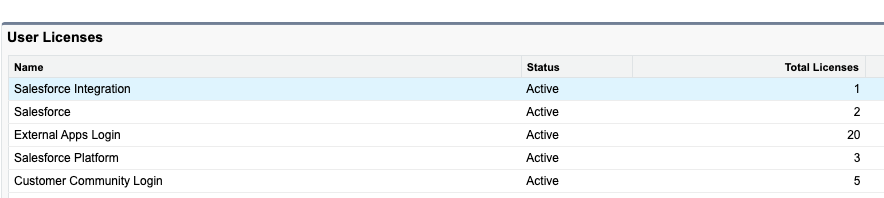
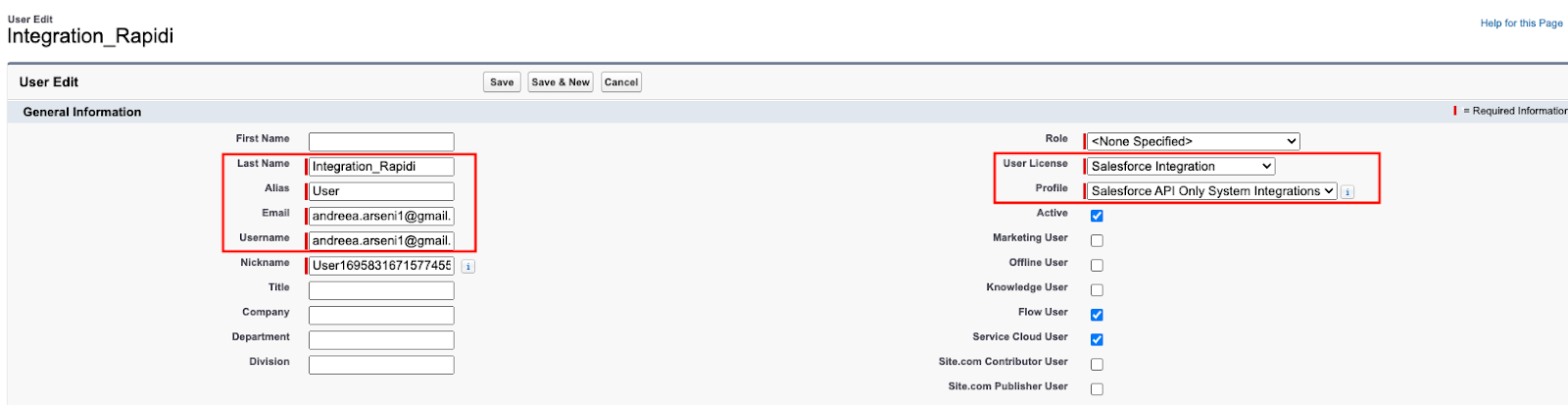
Next, you need to create a new user with the following information as shown below:
User License : Salesforce Integration
Profile: Salesforce API Only System Integrations
Then, you need to update/add the permissions set for this user:
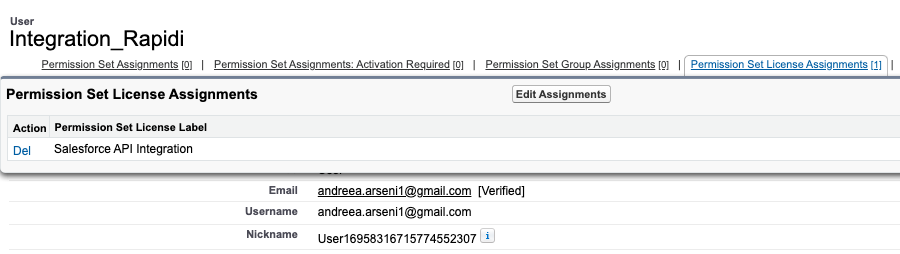
Click on Edit Assignments and the you choose the permission set that you want for this particular user:
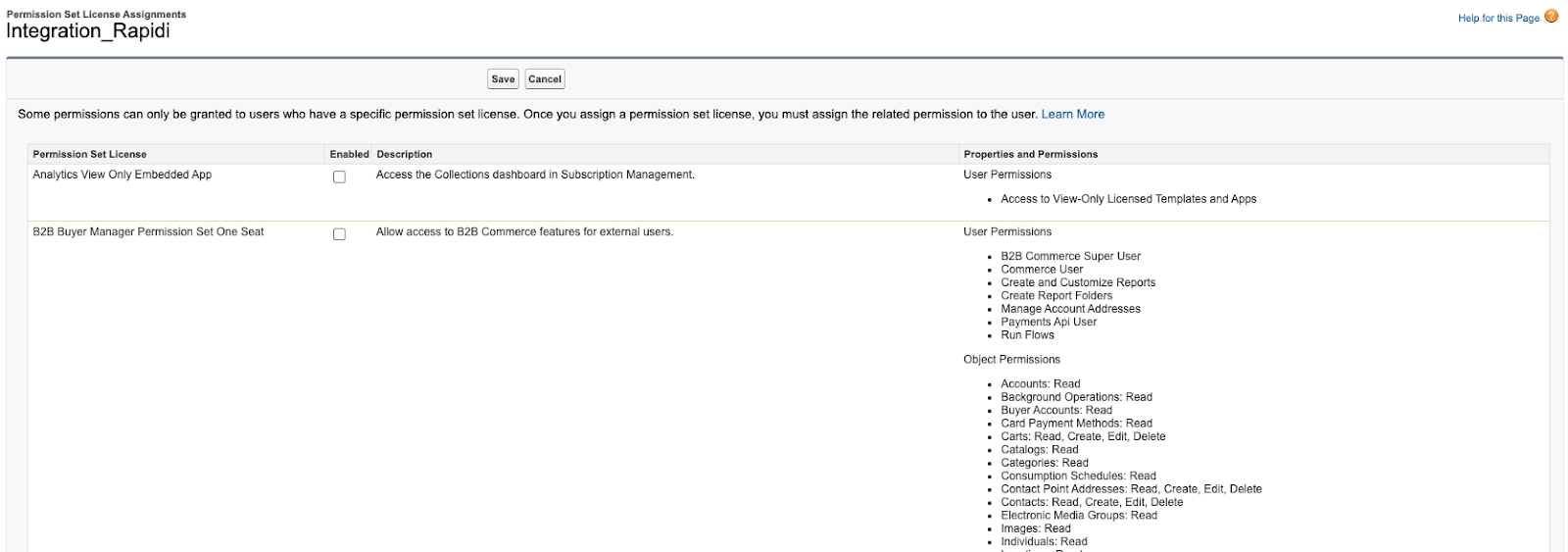
Note: in order to get access to all standard and custom objects, you need to create a new Permission Set ( without a license) so you can choose which objects you want to have access to and whether it needs to be read, write, delete,etc.
Once you have assigned a specific permission set to this user, you will see it under
Permission Set License Assignments:
Each integration should be assigned to one user
How to Set Up and Configure an Integration User in Salesforce?
Using the System Administrator profile is the easiest way to set up access for a new integration.
However, this is not the best approach. It is often unnecessary to give system admin access for the integration user. In most cases, the integration can work perfectly fine without granting such extensive privileges. There may be rare occasions where the integration specifically requires the System Administrator profile, but this is not the norm.
To set up a dedicated integration user, follow these steps:
-
Create a new user for each integration.
-
Assign the Salesforce Integration User License, which automatically provides:
-
Salesforce API Only System Integrations profile
-
Salesforce API Integration permission set license
-
-
Enterprise, Unlimited, and Professional orgs come with five Salesforce Integration User licenses at no extra charge. Additional licenses can be requested through your Account Executive (AE).
-
API Only access: Users can access Salesforce only via REST, SOAP, or Bulk API, not the user interface.
Using the same user account across multiple integrations may result in increased access privileges beyond what is necessary, which goes against the principle of least privilege access. Additionally, this practice increases the potential security impact in the event that the user or integration is compromised.
By using a dedicated integration user, you can limit access to only the necessary permissions, such as login IP ranges, to ensure that it can perform its job effectively.
In the Setup → Company Information section, you can locate:
-
Salesforce Integration under User Licenses
-
Salesforce API Integration under Permission Set Licenses
The Salesforce Integration user license assigns an integration user and populates their profile with Salesforce API Only System Integrations.
After verifying the new account, Salesforce displays a notification stating that access is limited to API Only users. To log in, the REST, SOAP, or Bulk API must be used for all future logins.
We hope you find this useful, if you need further assistance please contact our support team who will be happy to help you out.
Why should I use a dedicated Integration User?
Using a dedicated integration user: Improves data integrity and tracking of automation activity. Keeps integrations secure and auditable. Avoids using someone’s actual Salesforce user license (saving license cost). Helps enforce least-privilege access.
How many Integration User Licenses are available?
If your org is on Enterprise, Performance, or Unlimited editions, you receive up to five Integration User Licenses at no extra cost. Additional licenses are around ~$10 each.
Why should I use an Integration User instead of a normal Salesforce user?
Using a normal user for integrations is risky because it’s tied to a real person. If that person changes their password, leaves the company, or loses access, the integration can stop working. A dedicated Integration User is created only for API access and isn’t linked to anyone. It keeps the integration stable, more secure, and easier to manage by allowing you to grant only the permissions it actually needs.
Updated January 2026