New & Improved Comment Feature in MyRapidi
Hooray my friend - we are back again with some exciting new and useful features on MyRapidi. The first feature we would like to tell you about is the Comment feature, which we gave a good brush-over and some nice enhancements which should make your work with RapidiOnline even more efficient.
Comments throughout the entire configuration interface
The goal with the comment feature is mainly to document any special setup that has been made in the configuration and the reasons for doing this special setup. This, together with the actual setup, will make it easier for other people to understand the specific setup.
The Comment feature is now available to you in all configuration areas in the service such as the Dashboard, Transfers, Schedules, Groups, Tags, Connections & Link Storages. Use the comments on the Dashboard to document any special setup concerning the entire configuration.
Comments on Transfers
On the Transfers page we have moved the Comment icon from the 'General' section to the Transfer header. This allows you to have a more direct access to the comments concerning the entire Transfer. You can still add specific comments to sections like 'Source Control' or 'Field List'.
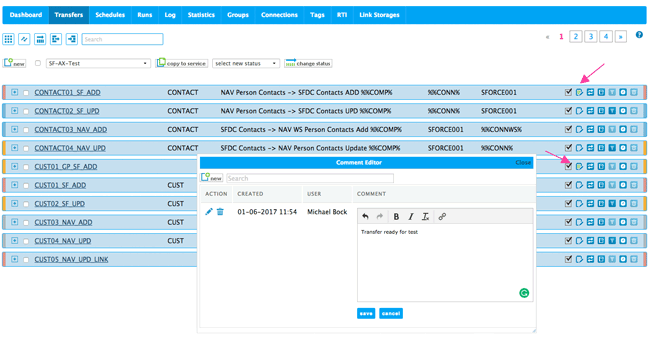
Image 1: Comments on Transfers with the Comment Editor
By clicking on the Comment icon it opens up a window where you can view and search the comments. The comment icon will indicate if there are some comments - if there are, it is filled with green text. When you hover or go over the icon it shows how many comments there are.
To edit or add comments simply click the comment icon and a new window will display all existing comments. Click the 'new' button to add a new comment. The WYSIWYG editor gives you the option to format your text including adding links. We have reduced the formatting options to the basic options (bold, italic, underline and links) as those options will also be the options supported when printing the configuration (we will soon release a new feature to generate a pdf documentation of specific parts of the configuration).
Comments on other areas of the configuration
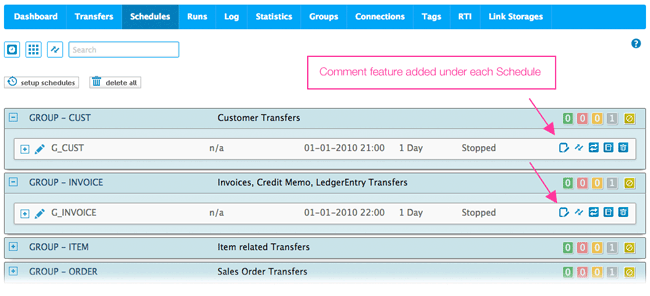
As mentioned you can also add comments on Schedules, Groups, Connections, Tags, Link Storages and the Dashboard. The comment icon is generally available in the header line under each area. Please see the image below as an example on where to find the comment feature.